Phase 1: The New Era of Web Creation
Before you start building, it is important to understand how the landscape has shifted. The "how" of building a website depends entirely on your goals and the tools you choose.
What is Vibe Coding?
"Vibe coding" is a term that exploded in popularity in early 2025, championed by AI experts like Andrej Karpathy. In the traditional workflow, developers had to write every single line of code manually. If they missed a semicolon, the whole site would break.
Vibe coding is different. In this workflow, you act as the project manager, and Artificial Intelligence (AI) acts as the coder. You provide the intent—the "vibe"—and the AI handles the difficult implementation. You can say things like, "Create a login button that glows blue when hovered," and the AI writes the code instantly. It allows you to focus on creativity and forget that the code even exists.
The Three Main Paths to Building
To build a website today, you generally choose one of these three paths:
- The Vibe Coding Path (Best for Innovation): You use AI tools like Bolt, Lovable, or Cursor. This is perfect if you want a unique startup idea, a web tool, or a highly specific design without hiring a developer.
- The Website Builder Path (Best for Simplicity): You use platforms like Wix or Squarespace. These are "drag-and-drop" tools. They are easy to use for beginners but can be hard to move away from later.
- The WordPress Path (Best for Content): You use a Content Management System (CMS). This powers over 40% of the web. It is great for big blogs or news sites but requires more maintenance.
Phase 2: Planning Your Digital Architecture
A common mistake beginners make is skipping the planning phase. They jump straight into picking colors. This leads to messy sites that confuse visitors. Before you open any tool, you need a map.
Define Your Goal
Ask yourself: What is this site actually for?
- To Sell: You need an E-commerce setup with a secure checkout and product pages.
- To Impress: You need a Portfolio with high-quality image galleries and large visuals.
- To Inform: You need a Blog with a clean reading layout and newsletter integration.
Know Your Audience
Who are you building for? A website for a law firm needs a serious, trustworthy vibe. A website for a video game needs a dark, energetic vibe. Understanding this helps you write better prompts for the AI later.
Map the Sitemap
Create a simple list of the pages you need. For most websites, this includes:
- Home: The main hook that explains what you do.
- About: Your story and team.
- Services/Products: What you offer to the customer.
- Contact: A form or email address to reach you.
Phase 3: The Best Tools to build a website
If you choose the modern vibe coding route, you need the right software. The market is flooded with new AI agents, and finding the one that matches your specific needs can be overwhelming.
Where to Find the Best Vibe Coding Tools
This is where a dedicated navigator becomes essential to save you time.
Resource Recommendation: Vibe Coding Navigator For the most up-to-date collection of tools, you should visit Vibe-Coding.uk. This website serves as a comprehensive navigation hub designed specifically for this new era of development. It collects, categorizes, and reviews the best vibe coding tools available on the market. Whether you are looking for an automated code writer, a full-stack app builder, or specific debugging agents, this site organizes them for you. It is a critical resource for both beginners and experts to discover the software that will speed up their project. Instead of testing random tools yourself, you can find curated options that fit your exact goals immediately.
Popular Vibe Coding Engines
Once you have explored the navigator, you will likely encounter these top engines:
- Bolt.new: This tool is incredible for building full-stack web applications directly in your browser. It allows you to deploy to the web in one click.
- Lovable: This platform positions itself as an "AI software engineer." It is excellent for turning visual ideas into real, working code.
- Cursor: This is a code editor for people who want to vibe code but still want to see the files. It predicts what you want to type next, speeding up the process massively.
Phase 4: Step-by-Step Guide to Building a Website
Let's look at how to build a website using a vibe coding workflow. This is the modern way to get things done fast.
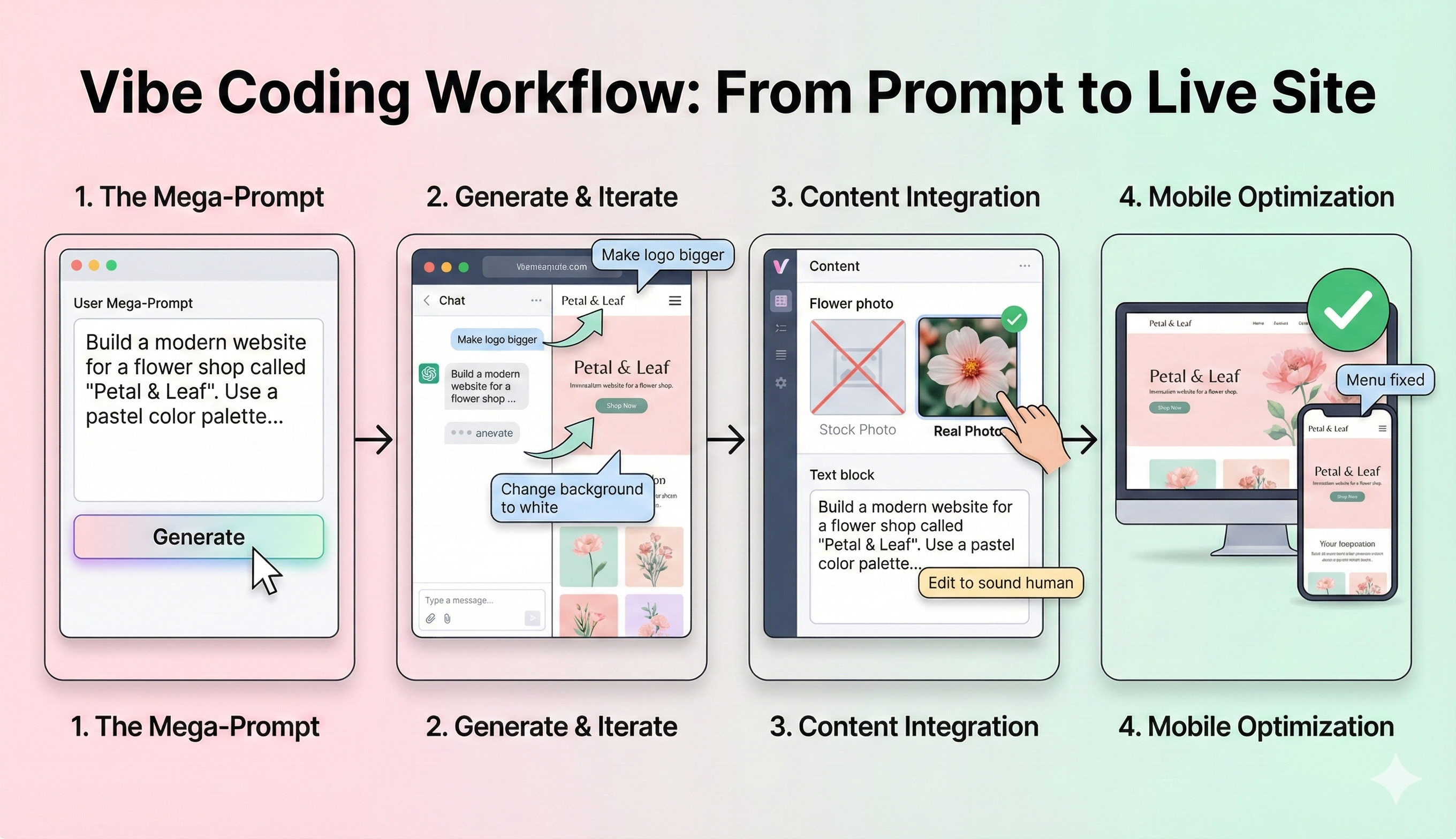
Step 1: The "Mega-Prompt"
Start by writing a detailed description of your website. Do not be vague. The AI needs specific instructions to give you a good result.
Bad Prompt: "Make a flower shop site."
Good Prompt: "Build a modern website for a flower shop called 'Petal & Leaf'. Use a pastel color palette with soft pinks and greens. The homepage should have a large hero image, a section for 'Best Sellers', and a newsletter signup form. The font should be elegant and readable."
Step 2: Generate and Iterate
Paste your prompt into your chosen tool (like Bolt or Lovable). In seconds, the AI will generate a live preview of your site. Now, you refine the vibe.
- Iterate Visuals: "Make the logo bigger." "Change the background to white." "Add a shadow to the buttons."
- Iterate Function: "Make the 'Buy' button open a contact form." "Add a Google Map to the footer."
This conversation is the core of vibe coding. You are shaping the product through continuous feedback.
Step 3: Content Integration
You need text and images to fill the pages.
- Text: You can ask the AI to draft your 'About Us' page. Just make sure to edit it so it sounds like a human wrote it, not a robot.
- Images: Avoid generic stock photos if possible. Real photos build more trust. If you lack photos, use AI image generators to create specific assets that match your brand's color scheme.
Step 4: Mobile Optimization
This is non-negotiable in 2025. More people browse on phones than on desktop computers. Most vibe coding tools handle this well, but you must verify it. Resize your browser window to the size of a mobile phone. Does the menu look good? Is the text too small? If the layout breaks, tell the AI: "Fix the mobile menu layout" or "Make the text larger on mobile screens".
Phase 5: Technical Essentials (Domain and Hosting)
Your website needs a home on the internet. Even with AI, you still need a digital address and a place to store your files.
Choosing a Domain Name
Your domain is your address (like google.com). It is the first thing people see.
- Keep it short: Long names are hard to type and easy to misspell.
- Make it easy to say: Avoid hyphens and numbers. They cause confusion when you tell someone your website name out loud.
- Stick to.com: It is still the most trusted extension. However, extensions like .io (for tech) and .store (for shops) are becoming very popular.
Web Hosting
Hosting is the service that keeps your website online.
- If you use a Builder: Hosting is usually included in your monthly subscription fee (e.g., Wix or Squarespace).
- If you Vibe Code: Tools like Bolt often allow you to deploy to Netlify or Vercel. These are high-performance cloud hosts that often have free tiers.
- If you use WordPress: You will need a host like Hostinger or Bluehost. Managed WordPress hosting is best because they handle security updates and backups for you.
Phase 6: Design Principles for Non-Designers
You don't need a degree in art to make a site look good. You just need to follow a few simple rules.
Use Whitespace
Do not clutter the screen. Space makes your content look elegant and professional. It makes the text easier to read.
Visual Hierarchy
Guide the visitor's eye. The most important elements should be the biggest.
- H1 Tags: Your main headline should be large and bold.
- Buttons: Your "Call to Action" (like 'Buy Now') should be a bright, contrasting color so it stands out.
Accessibility
The web must be inclusive for everyone.
- Contrast: Ensure your text stands out clearly against the background. Grey text on a white background is hard to read.
- Alt Text: Add descriptions to your images. This helps people who use screen readers to understand what is on the page.
Phase 7: SEO (Getting Found on Google)
You want people to find your website. This is where Search Engine Optimization (SEO) comes in.
Keywords
These are the words people type into Google. For this article, the keyword is "how to build a website." You should use your main keyword naturally in your title, your main headline, and the first paragraph of your text.
Meta Tags
These are the invisible labels that tell Google what your page is about.
- Meta Title: The blue link that shows up in search results. Keep it under 60 characters.
- Meta Description: The short summary under the link. Keep it under 160 characters. It should convince the user to click.
Site Speed
Google hates slow websites. Vibe coding tools generally produce clean code, but large images can slow you down. Always compress your images before uploading them to your site.
Phase 8: Common Mistakes to Avoid When Building a Website
The path to a successful website is filled with pitfalls. Avoiding these common errors will save you time and money.
- Over-Complication: Do not add a forum, a shop, and a blog all at once. Start with a simple version of your site and grow it later.
- Ignoring Analytics: You cannot improve what you do not measure. Install Google Analytics on day one so you can see how many people are visiting.
- Broken Links: Click every single button on your site before you launch. A link that goes nowhere frustrates users and hurts your SEO ranking.
- No Contact Info: Make it very easy for people to find your email or phone number. If they have to hunt for it, they will leave.
Conclusion
Learning how to build a website in 2025 is an empowering journey. The barriers that once stopped beginners—complex syntax, server management, and expensive developers—have crumbled.
Whether you choose a traditional CMS like WordPress or embrace the new world of vibe coding, the power to create is now in your hands. The most important step is simply to start. Define your goal, find the right tools on a trusted navigator like vibe-coding.uk, and let your ideas flow. The digital world is waiting for what you will build next.